
How to Add AI Chatbot on WordPress Website

Written By : Shantilal Matariya

Published on : September 1, 2025

8 min read


Thinking about giving your WordPress site a real upgrade? AI chatbots make it possible to offer instant answers, capture more leads, and support visitors 24/7—without stretching your team. The best part: you don’t need coding skills or a big budget. Today’s tools let you add AI chatbot to WordPress in just a few clicks.
AI chatbots are changing the way websites connect with visitors, including WordPress sites. Whether you run an online store, a blog, or a business website, chatbots can make customer service easier, answer common questions, and keep visitors interested.
In this guide, we’ll show you How to Add AI Chatbot on WordPress Website the right way. You’ll learn how to choose the right chatbot, compare popular options, and set one up on WordPress step by step. Whether you have an online store, blog, or service business, you’ll leave with a chatbot that improves user experience, saves time on support, and boosts conversions.
Step-by-step Guide to Add AI Chatbot to WordPress Website
Now for the fun part – setting up your AI chatbot! This simple guide will walk you through every step using SmartConvo, so you can easily add chatbot WordPress functionality to your site.
Step 1: Log In to SmartConvo
Start by visiting the SmartConvo website and clicking Sign In at the top-right corner. If you don’t have an account yet, select Get Started to register.
After logging in, you’ll see the SmartConvo dashboard. From here, you can use features like Custom Bots, Train on Your Data, AI Copilot, and more. It’s the main place to create and manage your WordPress chatbot easily.
Step 2: Create an AI Chatbot Folder

On the left-hand panel under Created Folders, click Create a Folder. Give the folder a name that matches your chatbot’s purpose—for example, “Support Bot” or “Ecommerce Sales Bot.”
This folder helps you keep your training documents and chatbot projects organized and easy to find. You can also add chatbot documents here to build a strong knowledge base for your AI assistant.
Step 3: Create a Document for Training
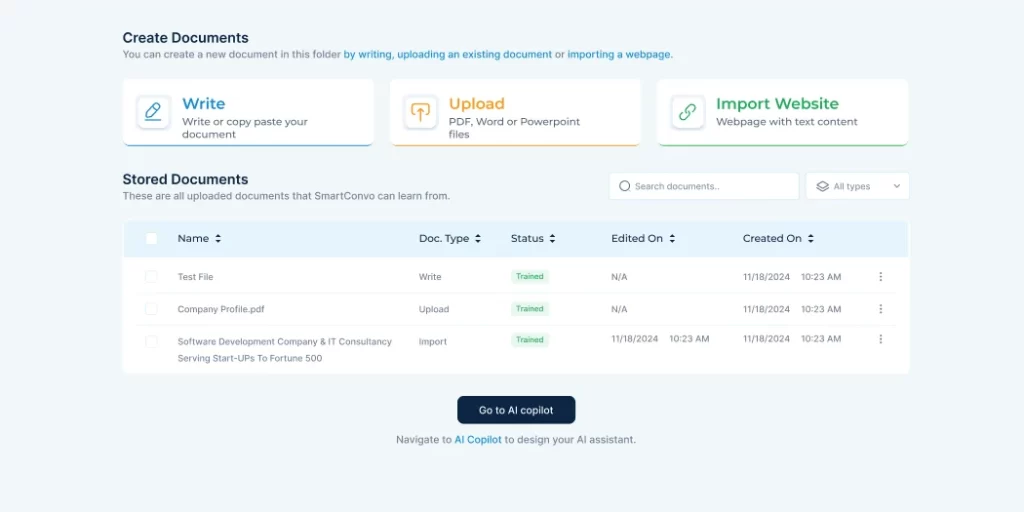
Open the folder you created and upload the content that will train your chatbot to answer questions correctly. SmartConvo gives you multiple options:
- Write: Manually type or paste FAQs or help content.
- Upload: Import PDFs, Word, or text files.
- Import Webpage: Add content directly from a URL.
- Google Drive: Import files stored in your Google Drive.
These documents will act as your chatbot’s knowledge base. Once uploaded, you’re ready to start configuring the chatbot itself.
Step 4: Create and Configure an AI Copilot
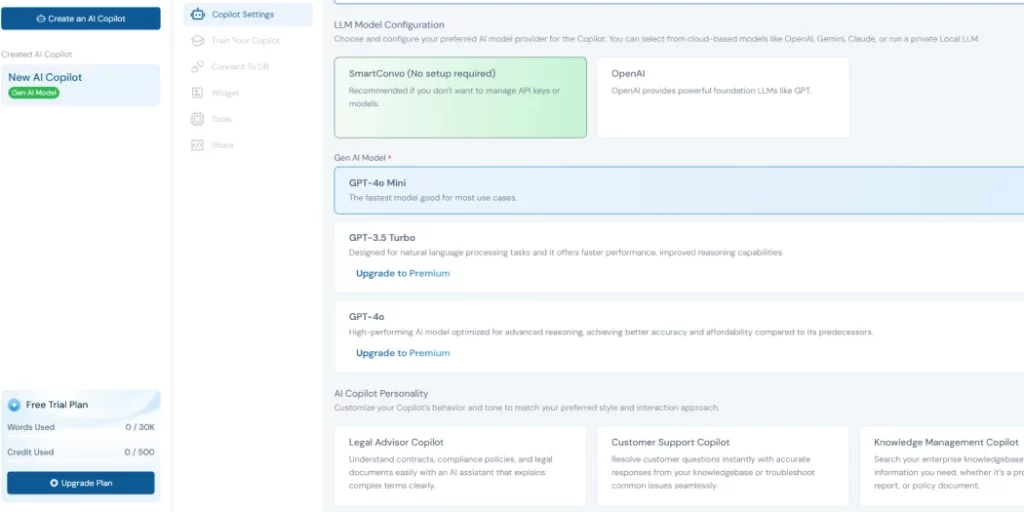
From the left panel, click Create an AI Copilot. Give your Copilot a meaningful name (e.g., “WordPress Support Bot”) and a short description of what it does.
Next, choose your AI model:
- SmartConvo Model (recommended for easy setup)
- OpenAI (GPT models), if you have your own API key
Assign a role (like Sales, HR, IT, or Customer Support) or write custom instructions to tailor the bot’s behavior. You can also decide whether the chatbot replies instantly, shows sources, or uses a custom response style.
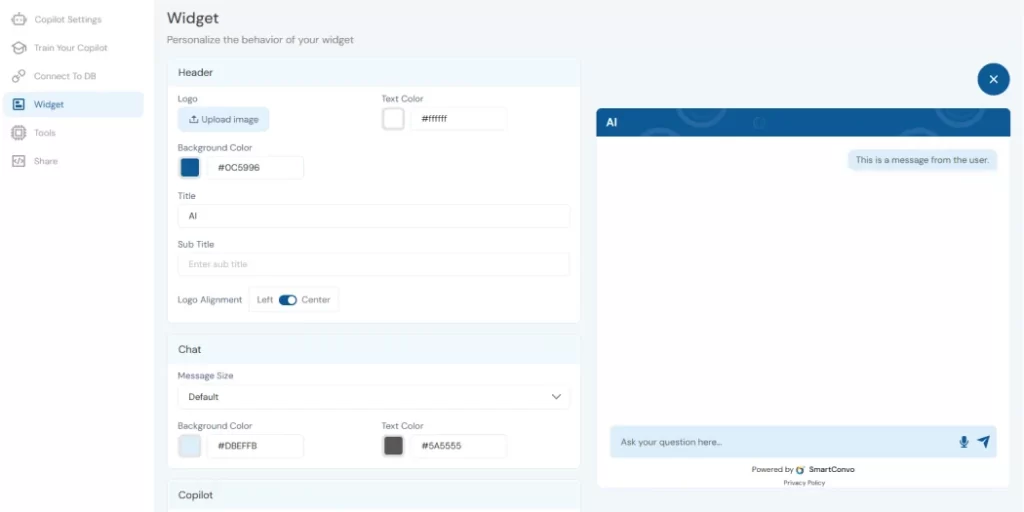
Finally, customize the chatbot widget:
- Edit the welcome message
- Choose where the chatbot should appear on your WordPress site
- Match the widget design with your brand (colors, theme, etc.)
Click Save & Next to activate your AI Copilot.
Step 5: Get the WordPress Embed Code
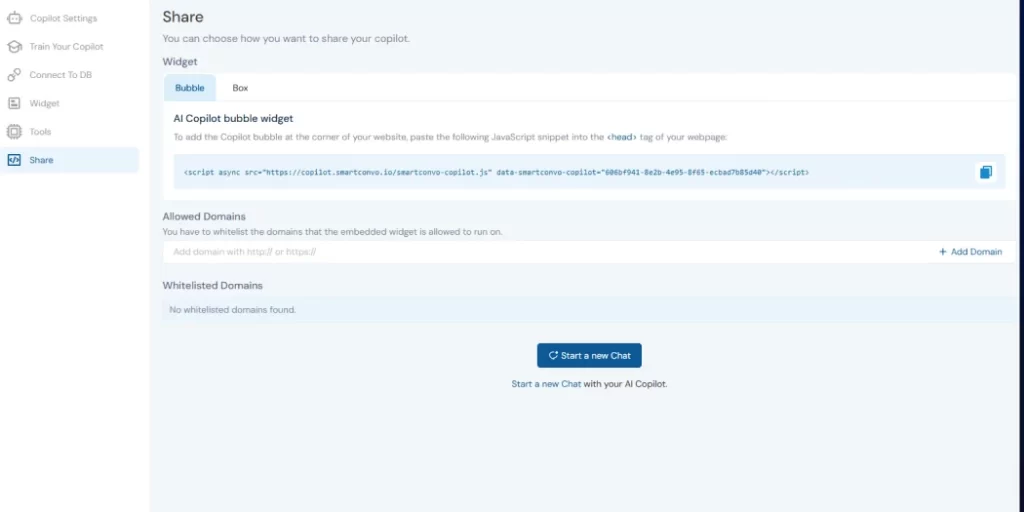
Go to the Widget section in your Copilot’s settings. SmartConvo will generate a JavaScript embed code. Copy this snippet—it’s what will connect your chatbot to your WordPress site.
Step 6: Install the AI Chatbot on Your WordPress Site
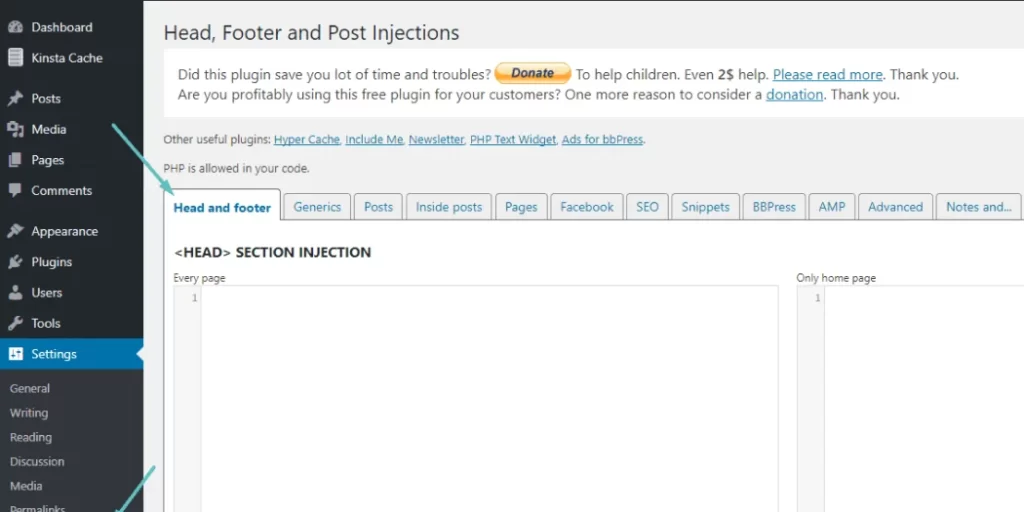
Now it’s time to add the chatbot to your WordPress site:
- Log in to your WordPress admin dashboard.
- Install the Insert Headers and Footers plugin (or any similar plugin for adding scripts).
- Navigate to Settings → Select option Headers and Footers plugin.
- Paste the SmartConvo embed code into the Header section.
- Save your changes.
Once saved, refresh your WordPress site, and your AI chatbot will appear live, ready to engage with visitors.
Why Use an AI Chatbot on WordPress Website?
Adding an AI chatbot for WordPress website offers more than just automated replies—it can completely change how you connect with visitors and manage your site. Here’s why:
- 24/7 Customer Support: AI chatbots offer instant help, even after hours, so visitors get answers fast—turning them into customers instead of losing them to competitors.
- Boosted Lead Generation: Chatbots ask the right questions, qualify leads, and collect contact details. Unlike forms, they start conversations, understand needs, and guide visitors—boosting leads and conversions.
- Cost Savings: AI chatbots save money by managing multiple chats simultaneously without needing salaries, breaks, or extra staff. They deliver efficient customer support at a lower cost.
- Valuable Insights: Every chatbot interaction reveals customer preferences, questions, and issues, helping you improve your products, services, and content.
- Better User Experience: Visitors want quick, personalized responses. Chatbots deliver, making your site more engaging. Happy visitors are more likely to return and recommend it.
In short, Integrate AI Chatbots with WordPress to make it easier to support customers, generate leads, save money, and improve the overall experience.
Choosing the Right AI Chatbot for WordPress
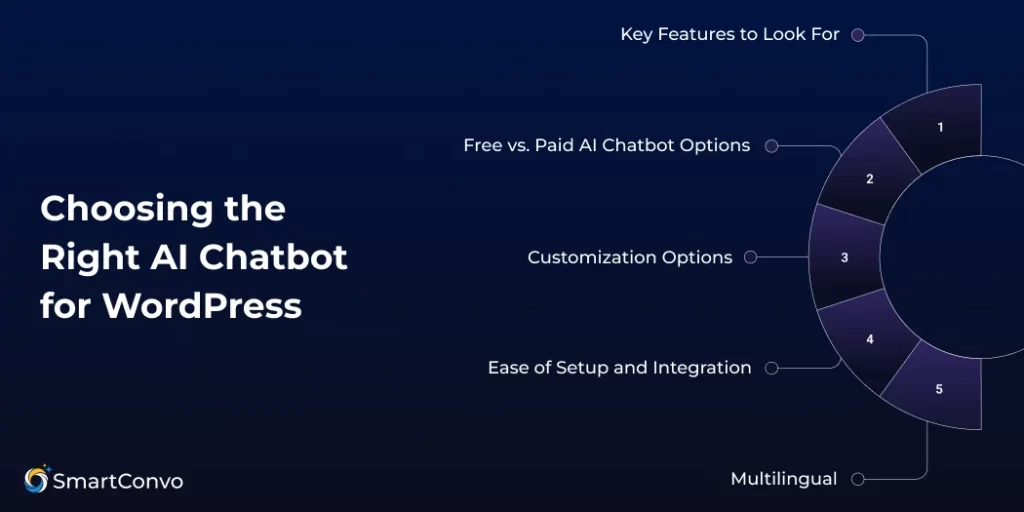
Choosing the right AI chatbot depends on your needs, budget, and technical setup. Not all chatbot platforms are the same—what works for one WordPress site might not work for another!
Key Features to Look For
When choosing an AI chatbot, here’s what to focus on:
- NLP: Choose a chatbot with advanced NLP for natural, context-aware conversations.
- WordPress Integration: Choose one with simple plugins or embed codes for easy setup.
- Customization: Ensure it allows changes to match your brand’s look and feel.
- Analytics: Look for reporting tools to track performance and improve results.
Free vs. Paid AI Chatbot Options
Free chatbots can be appealing if you’re on a budget, but they often have limits like low conversation caps, basic customization, and fewer integration options. Paid ones deliver advanced features, higher limits, and better support—valuable when you want to add chatbot WordPress seamlessly without restrictions.
Paid chatbots offer advanced features, higher limits, better customization, and professional support. Consider their value in boosting conversions, reducing support costs, and improving user experience.
Customization Options
It’s important to customize your AI chatbot so it fits your brand. Choose platforms that let you adjust the widget’s look, flow, and tone to match your WordPress site. This is especially crucial if you want your AI chatbot for WordPress website to feel natural and engaging.
You should also be able to customize how the chatbot talks. It should understand your industry’s terms, share useful info about your products or services, and guide users through your sales process.
Ease of Setup and Integration
The best AI chatbot platforms prioritize ease of use while offering flexibility. Look for ones that make it simple to Integrate AI Chatbots with WordPress through plugins or embed codes, ensuring quick setup without technical headaches.
Check if the platform requires coding or offers drag-and-drop tools for building conversation flows. A simpler setup means you can benefit from your AI chatbot faster.
Multilingual Support
If your WordPress site has visitors from around the world, making it multilingual is a must. AI chatbots can automatically detect a user’s language and respond in the right one, helping you connect with more people.
Some tools can translate content automatically, while others need you to set up each language manually. Think about the languages you need and pick a solution that works best for your audience.
Best Chatbot Platform For WordPress
SmartConvo is a great choice if you want to add AI chatbot to WordPress without coding. It’s user-friendly, highly customizable, and offers analytics so you can track performance.
The platform uses advanced Natural Language Processing (NLP) to make chatbot conversations feel natural and relevant. You can even train your chatbot with custom documents to suit your business needs and industry terms.
Setting it up with WordPress is simple—no coding needed. Just copy and paste the provided embed codes, and it works with any WordPress theme. This makes it perfect for small business owners, bloggers, and entrepreneurs who want professional chatbot features without the hassle.
SmartConvo offers customization options like colors, fonts, conversation flows, and greeting messages to fit your brand. It also includes analytics to track performance, user interactions, and conversions, helping you improve your chatbot and showcase its value.
With clear and affordable pricing, SmartConvo works for everyone—from individual bloggers to large businesses—making it an excellent option for WordPress sites.
Conclusion
Adding an AI chatbot for WordPress website is one of the smartest moves you can make. This guide has shown you how to add AI chatbot on WordPress website easily, plus how to choose the right tool, customize it, and set it up step by step.
Installing the chatbot is just the beginning. As it learns and interacts, it will improve over time. Businesses that regularly update, monitor, and Integrate AI Chatbots with WordPress effectively see higher engagement, better customer support, and more conversions.
AI chatbots offer big advantages. They provide instant support to your visitors, improve conversion rates by qualifying leads, and save time with automated customer service. Businesses that regularly update and optimize their chatbot see the best results.
Take the first step today and transform your website with AI chatbot technology from SmartConvo. Your customers and your business will thank you!
Frequently Asked Questions (FAQ)
You can use a plugin or embed code from tools like SmartConvo.
No, most WordPress chatbot plugins require zero coding skills.
Yes, it gives instant replies, handles FAQs, and works 24/7.
Yes, many plugins offer free versions with basic features.
Yes, it can track orders, suggest products, and assist customers.

With 8+ years of experience as a software engineer in the IT field, an Elite in Back-end development, DevOps, and Project & Team Management. Read more